
Creating an Agentic Design System
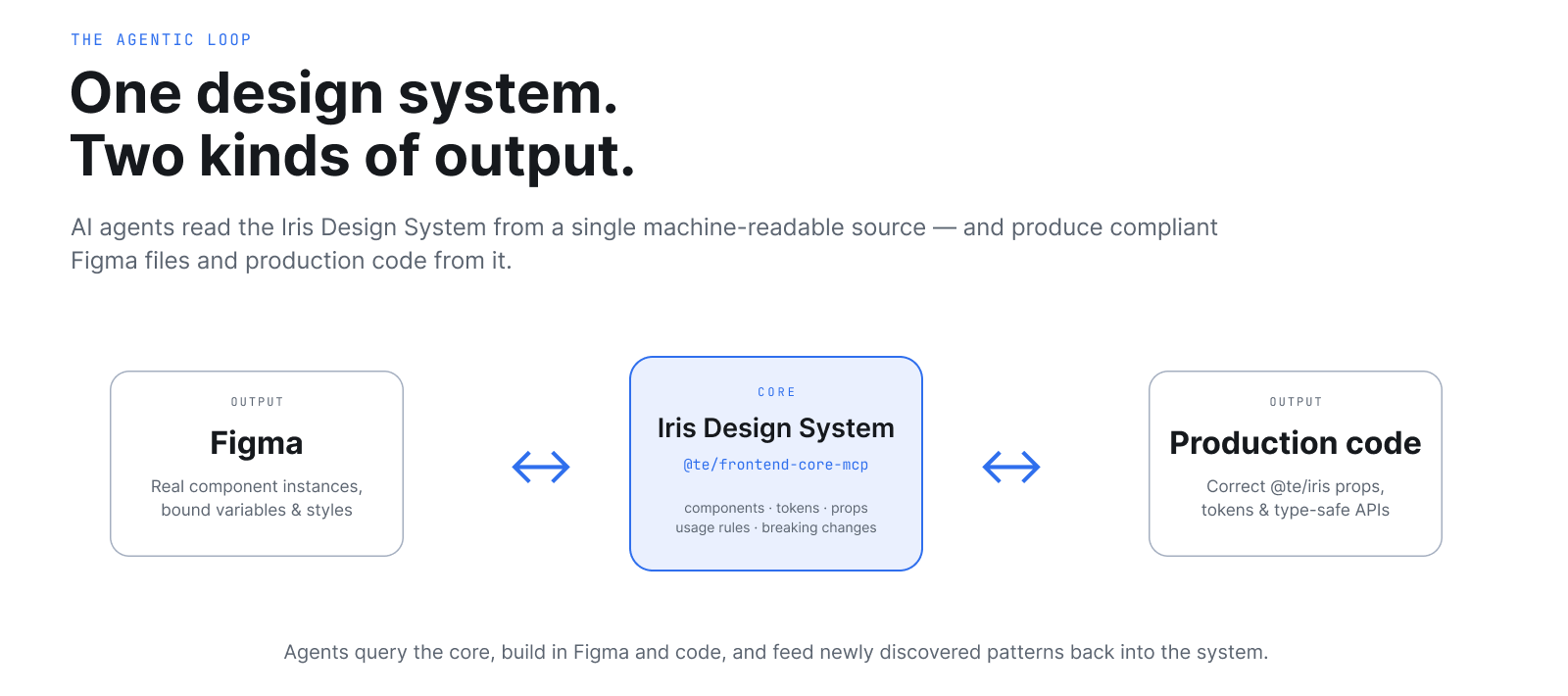
I led the design and engineering of an agentic design system at ThousandEyes (Cisco) — turning the Iris Design System from a static component library into a machine-readable operating layer that AI agents can navigate end to end. Designers describe what they want; agents produce compliant Figma files, production code, audits, documentation, and patterns using real components and tokens.
- Shipped to a 10-person design team in production use today.
- Estimated ~$390K/year of senior design capacity reclaimed.
- 75–90% time reduction on routine design system tasks.
- Built with Claude and Cursor, using Anthropic’s MCP protocol.
Project Details
Role Design Systems Lead
Timeline Q2–Q4 2026 (in progress)
Team Design Systems (me), 1 UX Engineer
Key Outcome Leverage existing resources to create a design system that an AI agent can design and build within
The Problem
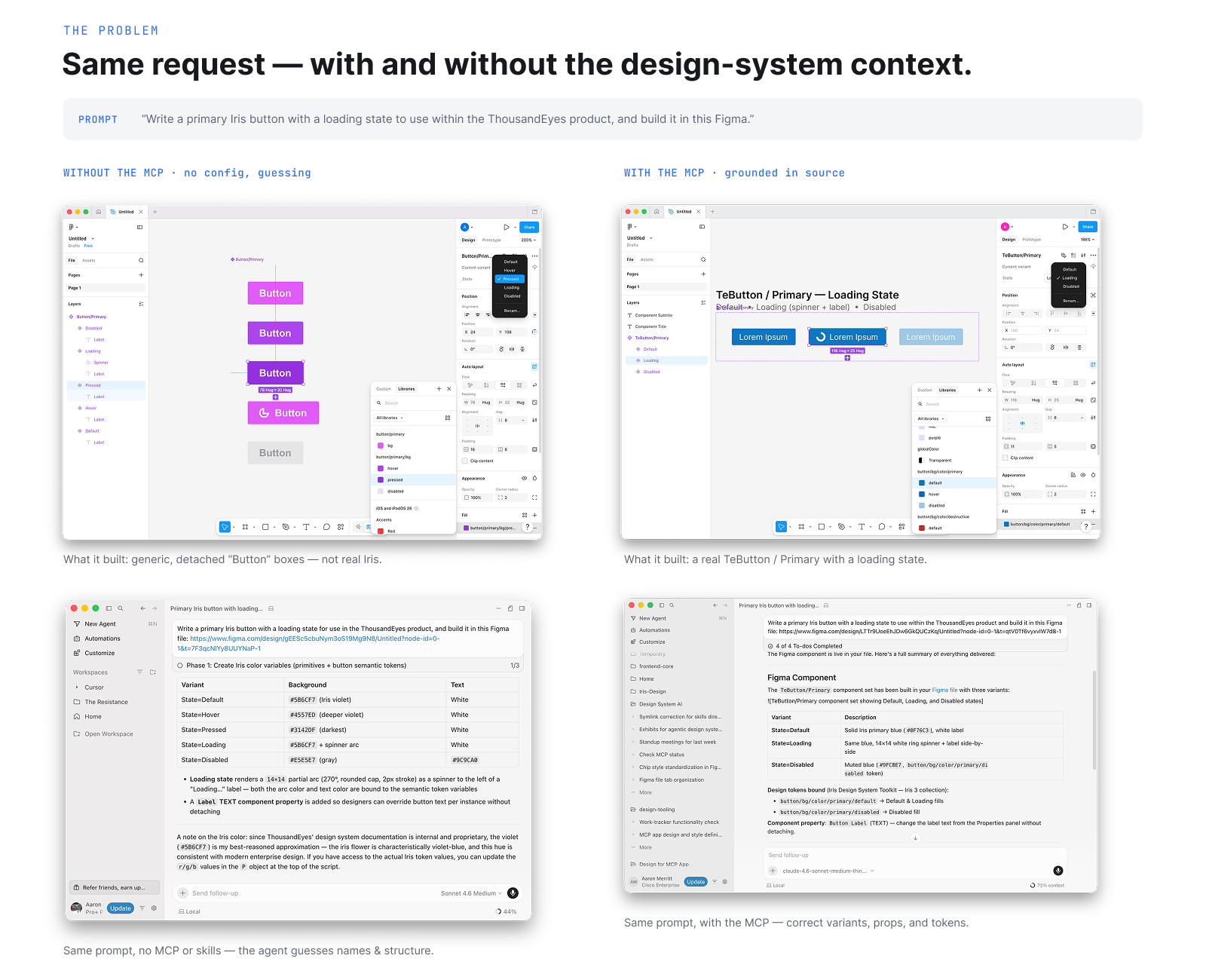
By 2025, every designer on my team was using Cursor, Claude, and ChatGPT. They were also getting wrong answers. Components that didn’t exist. Tokens with hallucinated names. Props that hadn’t been valid in two versions. Figma files built with detached instances. Generated code that referenced the wrong package.
The root cause was structural: our design system existed as a Vue component library, a Figma toolkit, and Confluence docs. Each was built for humans. None were legible to machines. AI tools were guessing — and guessing well enough to be dangerous.
A design system that can’t be read by AI doesn’t slow AI down. It just guarantees that the speed it brings is moving the product in the wrong direction.
The Insight
A design system isn’t a component library. It’s an operating system for taste.
The visible layer — tokens, components, usage rules — is only the surface. Underneath sits a deeper set of instructions: brand behavior, interaction philosophy, accessibility standards, motion logic, content tone, escalation patterns, product judgment. The system has to know not just which button to use, but when not to add a button at all.
If you want agents to produce work that meets your standard, you have to encode that standard in a form agents can act on. That’s the project.
This wasn’t a greenfield build. Everything we needed already existed — components, tokens, the Figma library, usage docs, voice guidelines. The work was to recognize what was already there and connect it into something an agent could navigate end to end.
What I Built
Four layers of infrastructure, each composable with the others.
1. The MCP server — `@te/frontend-core-mcp`
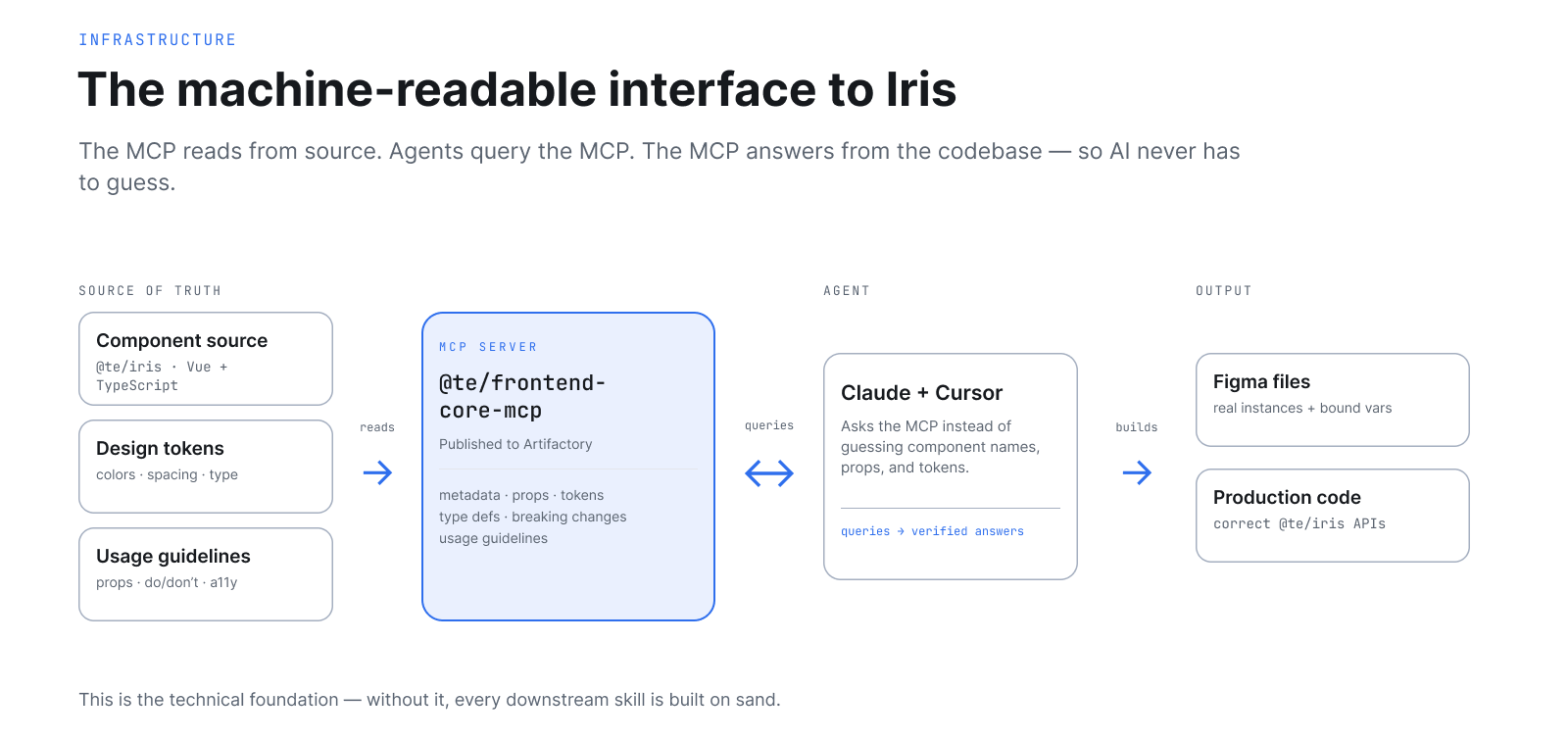
The machine-readable interface to Iris. Published to Artifactory. Exposes real-time component metadata, tokens, props, type definitions, usage guidelines, and breaking changes to any AI agent that asks. When Claude needs to know whether `TeButton` supports a `loading` prop in the version we’re on, it doesn’t guess. It asks the MCP. The MCP answers from source.
This is the technical foundation. Without it, everything downstream is built on sand.
2. The agent skill architecture
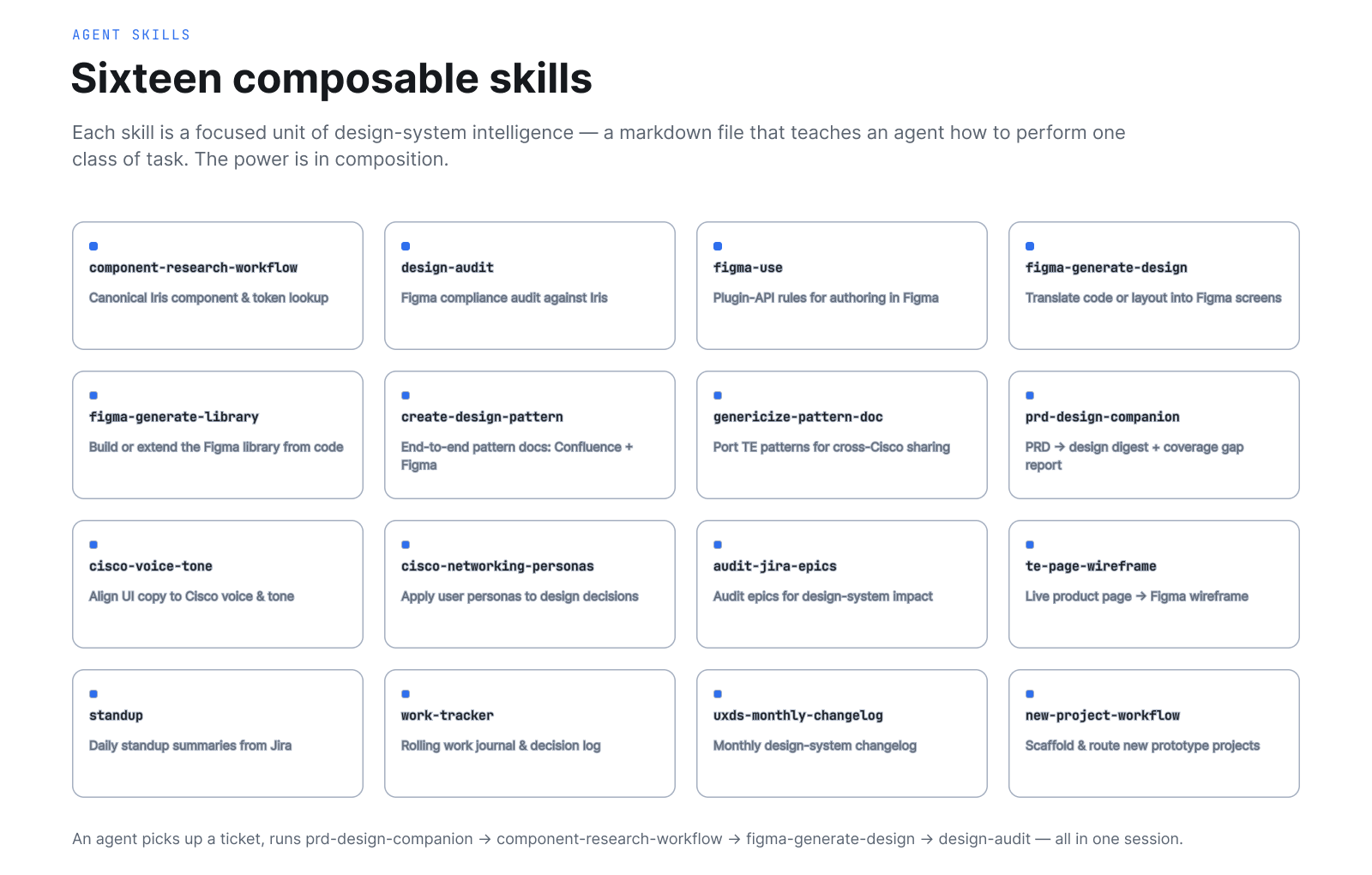
Sixteen composable skills, each a focused unit of design system intelligence. A skill is a markdown file that teaches an agent how to perform a specific class of task, what tools to use, what order, and what to verify.
- `component-research-workflow` — Canonical Iris component lookup.
- `design-audit` — Figma compliance audit (detached components, deprecated tokens, hardcoded colors, accessibility violations).
- `figma-use` + `figma-generate-design` — Agentic Figma authoring using real Iris components.
- `figma-generate-library` — Build or extend the Figma library from the codebase.
- `create-design-pattern` — End-to-end pattern documentation across Confluence and Figma.
- `prd-design-companion` — Parse PRDs into UI-focused design digests and run coverage gap analysis.
- `cisco-voice-tone` — Review and rewrite copy to match Cisco brand voice.
- `te-page-wireframe` — Capture a live product page via Playwright and wireframe it in Figma using Iris components.
- Plus ten more: standup intelligence, work tracking, Jira epic audits, pattern genericization, persona application, monthly changelogs, project routing, and more.
Each skill is small. The power is in composition. An agent picks up a Jira ticket, uses `prd-design-companion` to extract requirements, then `component-research-workflow` to find the right Iris pieces, then `figma-generate-design` to build the screen, then `design-audit` to verify compliance — all in one session.
3. The rules and convention layer
`AGENTS.md` files at workspace and project levels give agents persistent role context across every session. They know they’re a design systems lead. They know Iris is the default. They know what tools to consult, in what order, with what fallbacks. They know how to communicate, what level of confidence to express, what accessibility standards apply.
This is the part most easily overlooked and most quietly important. Without it, every agent session starts cold and hallucinates its way into bad defaults.
4. The distribution layer — `design-tooling`
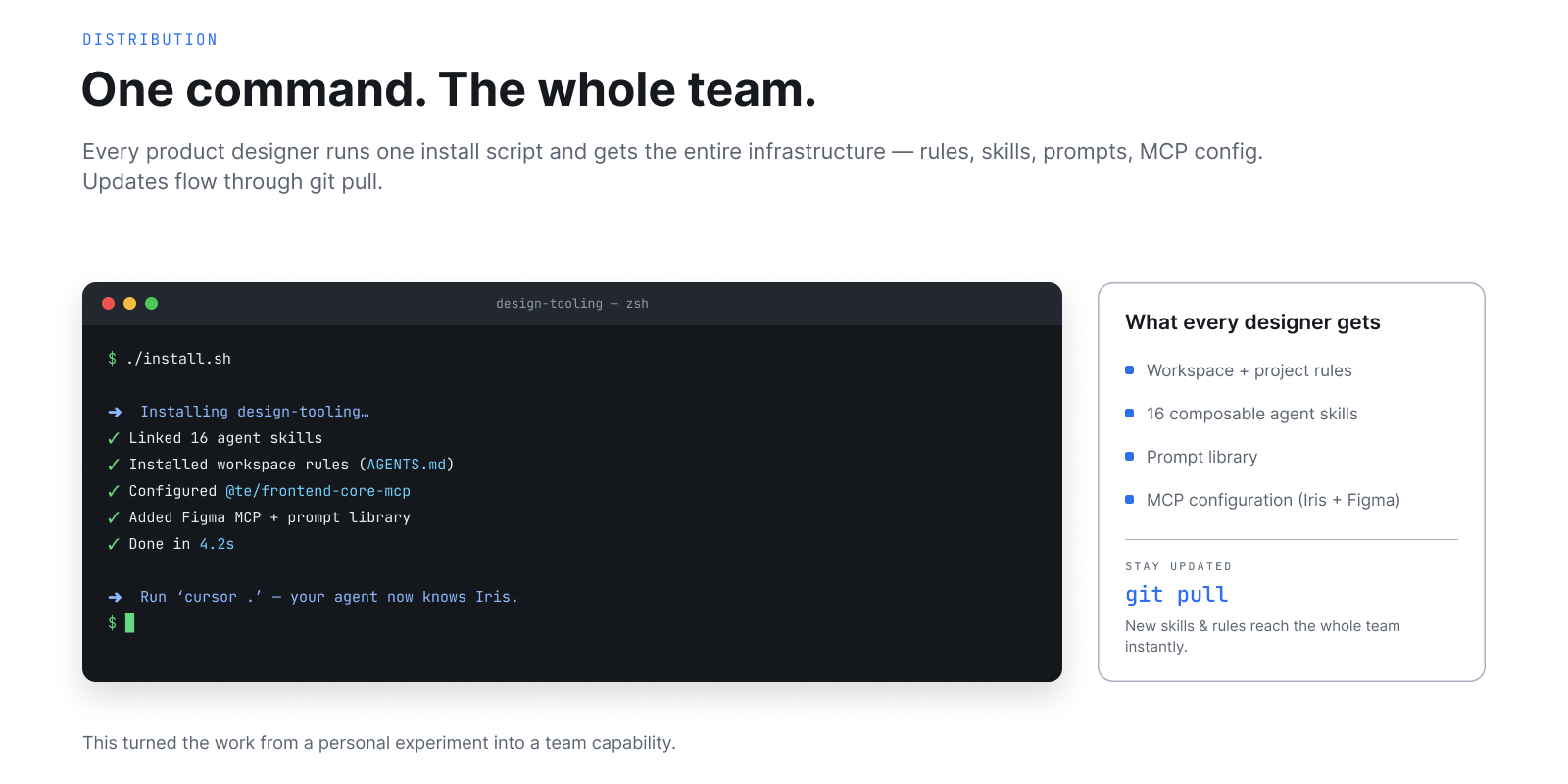
A shared GitHub repo with an install script. Every product designer on the team runs one command and gets the entire infrastructure — rules, skills, prompts, MCP configuration. Updates flow through `git pull`. This turned the work from a personal experiment into a team capability.
The Loop in Action
Here’s what a designer actually does now.
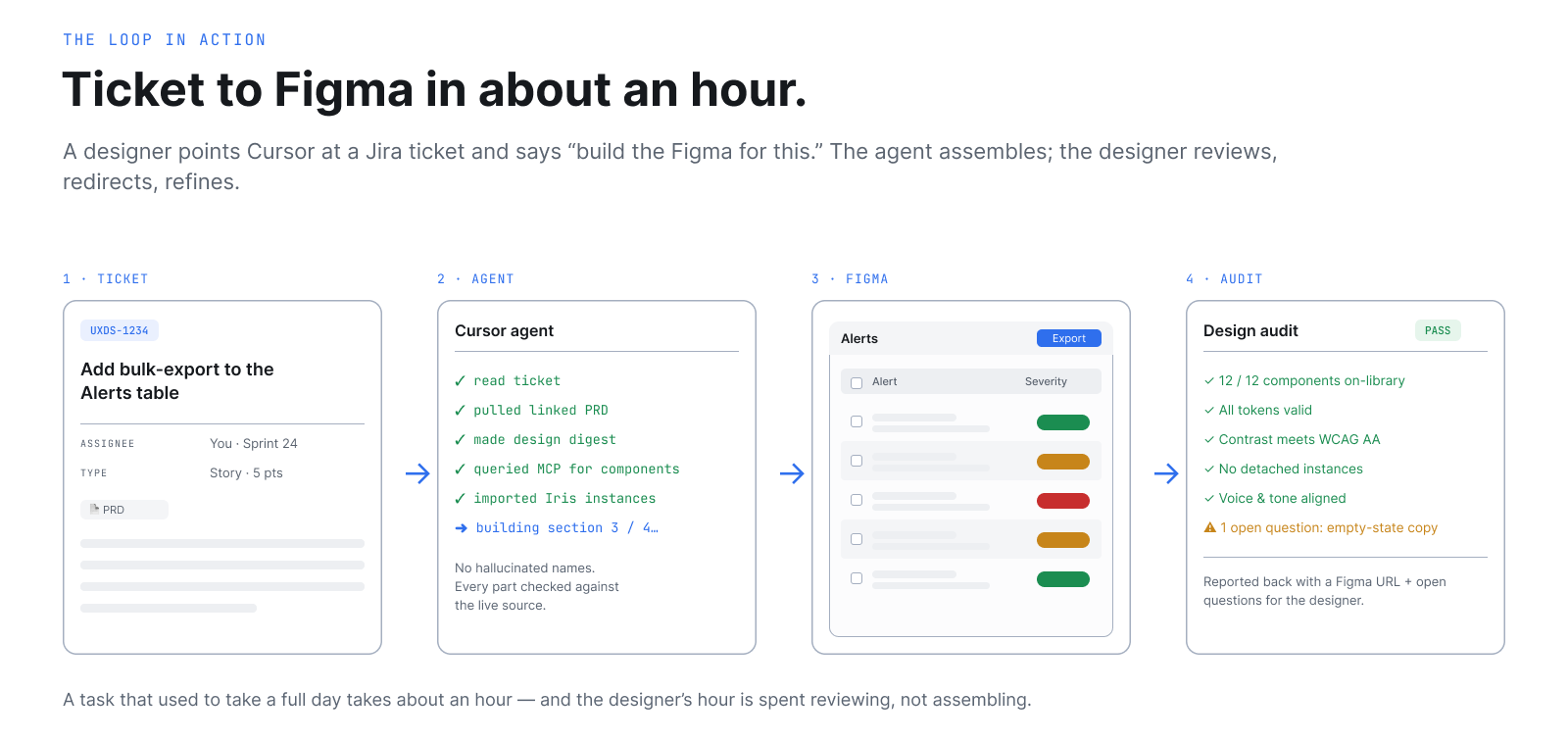
A designer opens Cursor, points it at a Jira ticket, and says: *Build the Figma design for this.*
The agent reads the ticket, pulls the linked Confluence PRD, generates a design digest, queries the MCP for the right Iris components and tokens, opens the Figma toolkit, assembles the screen section by section using real component instances and bound variables, runs a compliance audit on its own output, and reports back with a Figma URL and a list of any open questions.
A task that used to take a full day takes about an hour. The designer’s job during that hour is to review, redirect, and refine — not to assemble.
Outcomes & Impact
The system has been in production use by the ThousandEyes design team for months. Conservative estimates per task:
| Task | Before | After | Time saved |
|---|---|---|---|
| Find the right Iris component and its props | 20–45 min | 2–5 min | ~85% |
| Audit a Figma screen for Iris compliance | 60–90 min | 5–15 min | ~85% |
| Document a new design pattern (Confluence + Figma) | 3–5 hours | 30–60 min | ~80% |
| Translate a PRD into a design digest | 2–3 hours | 15–30 min | ~85% |
| Build a full page wireframe from a live product page | Full day | 1–2 hours | ~75% |
| Monthly design system changelog | 2–3 hours | 10–15 min | ~90% |
Reclaimed — roughly $390K/year in senior design capacity at standard blended rates. This excludes downstream savings: fewer review cycles, fewer rework loops from catching deprecated tokens early, better design-to-code fidelity reducing engineering back-and-forth.
The infrastructure itself was built incrementally inside normal team capacity. There was no separate budget. There was no dedicated buildout project. The cost was absorbed into the work it was already replacing.
The Role Shift
The most interesting outcome isn’t the time saved. It’s what designers do with the time they get back.
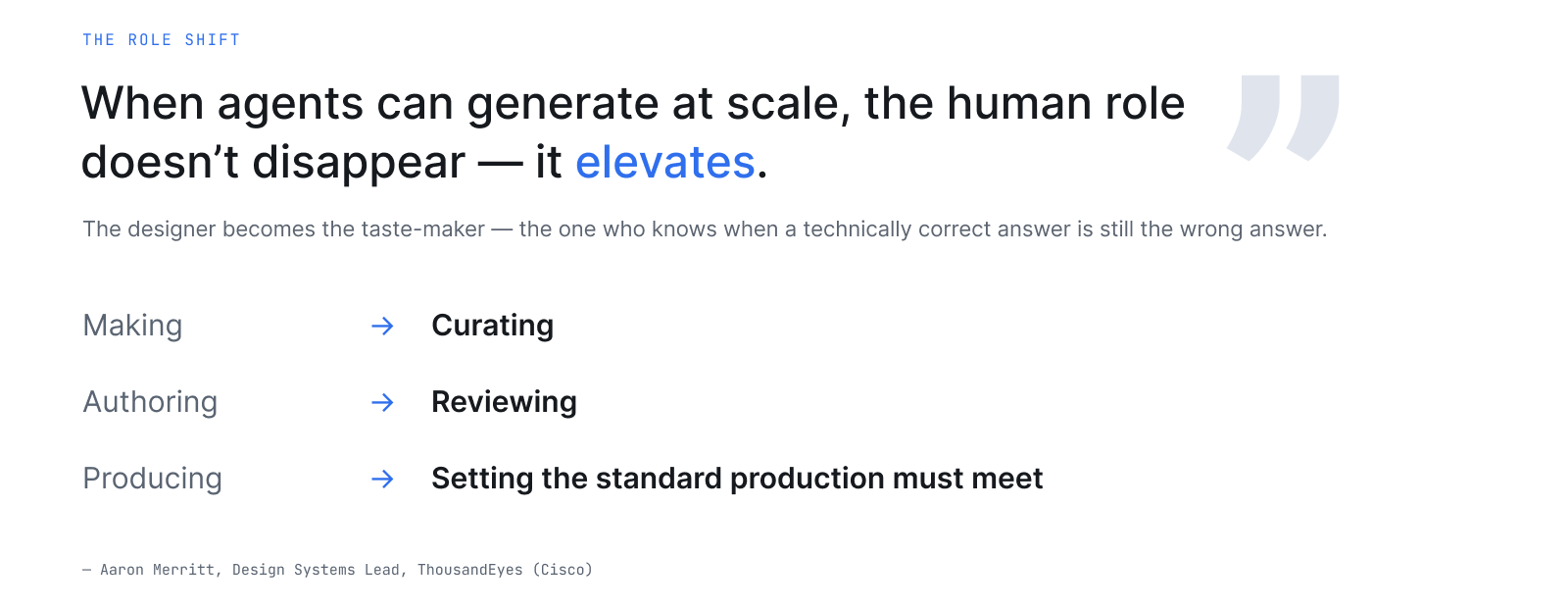
When agents can generate at scale, the human role doesn’t disappear — it elevates. The designer becomes the taste-maker. The person who knows when a technically correct answer is still the wrong answer. The one who decides what gets built, not just how it looks.
My job shifted from making to curating. From authoring to reviewing. From producing screens to setting the standard that production must meet. I now spend more time on research synthesis, pattern decisions, and accessibility judgment — and less time on production work an agent can do better than I can.
This is the role the next decade of senior design will be measured against.
What’s Still Being Built
This is leading-edge work, not finished work. The honest list of what’s next:
- History and audit layer. Agentic changes to Figma and documentation currently lack a versioned trail. A lightweight decision log tied to git or Confluence history is the next priority.
- Evaluation framework. Automated quality gates — does an agent-generated file pass a design audit? Does generated code pass linting and visual regression? — instead of human review as the only check.
- Research as machine-readable context. User research insights aren’t yet structured for agents to consult. Encoding research findings is how we close the empathy loop without losing it.
- Cross-Cisco distribution. The `design-tooling` infrastructure is currently ThousandEyes-scoped. The plan is to generalize it for other Cisco design teams using the pattern genericization workflow we already built
Tools & Stack
Built with: Claude (Anthropic), Cursor, Model Context Protocol, Vue 3, Iris Design System (`@te/iris`), Confluence, Jira, Playwright, GitHub.
The infrastructure was built using the same AI tools it serves. Claude wrote much of the MCP server. Cursor authored most of the skills. The recursive quality — using AI as a creative partner to build infrastructure that other designers use AI through — is the part I’m proudest of.
Why This Matters
Most AI design portfolios show apps built with AI tools. This case study is something different: it shows building the infrastructure that makes AI tools reliable inside a real design system, on a real product team, with measurable outcomes.
The category is new. The phrase “agentic design system” was niche when this work started in 2024. By the time of the first public conference dedicated to it in 2026, the version I built was already in production at Cisco. The market is moving toward this exact intersection of design systems, AI tooling, and infrastructure thinking — and I built one of the first ones that ships.
I’m currently exploring senior product design roles where this kind of systems-level thinking is the core of the work.
Aaron Merritt — Design Systems Lead, ThousandEyes (Cisco). imageotter.com/portfolio